Taxes are notoriously complicated, and while you might have a trusted accountant to tell you what you owe on your return, who tells you what all those taxes paid for in the end? Here to save the day (or at least provide some clarity) is LFA’s newly overhauled Taxpayer Receipt.
Using general information on location, income, and personal property, this tool estimates how much an individual or household in Utah is paying in state and local taxes and demonstrates where that money goes. While the old version of this tool gave information on state-level taxing and spending, this new version also estimates how much you’re paying in local taxes and where that money goes. It also lets you explore by the four major types of state and local taxes: income, sales, property, and fuel.
Tax Summary Page
You can see all of the estimates together on the summary page or explore each tax type on its own interactive page. On the summary page, data on all four tax categories are combined to give you an overall picture of your state and local tax liability. Then, using data on typical government spending by state and local governments, the diagram in the center of the page illustrates how the tax you pay is distributed to areas such as public education and infrastructure. On the right-hand side, you’ll see the final estimate “receipt” with a summary of payments and purchases.
Imagine you want the receipt for a taxpayer living in a $500,000 home in Sandy, who earns $85,000 filing jointly, owns a 2020 Nissan Armada, and drives 14,000 miles per year. This taxpayer’s results would look like this:

This taxpayer’s taxes are pretty evenly split across income, sales, and property taxes, with a smaller amount spent on fuel and fees. On the expenditure side, however, most of their taxes fund public education via the state and the school district, followed by state infrastructure spending. Without the Taxpayer Receipt, getting these answers would require far more effort.
Breaking It Down by Tax Type
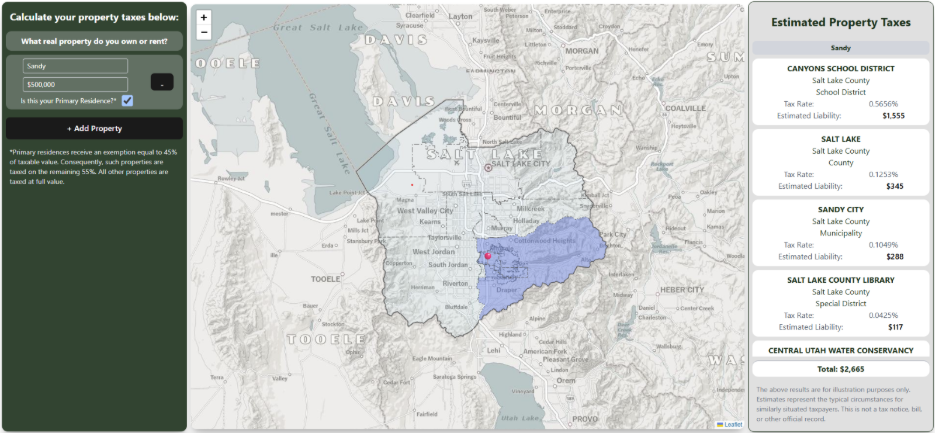
Now let’s explore the pages for each tax type. Each page shows more detail about various tax rates and how much you would pay in each category based on your location, spending habits, income, and property. You can also click the “User Guide” button at the top of each page for more information on how taxes are calculated. For example, if you want to understand how your property taxes are used, we’ll again use the example of a taxpayer with a $500,000 home in Sandy. After entering that information on the Property Tax page, you’ll see a map that shows all local government entities collecting property taxes on your home and how much each entity receives. In this example, this taxpayer’s annual property tax is about $2,700, split between Canyons School District, Salt Lake County, Sandy City, and others.
By helping Utahns better understand both what they pay and how those dollars are ultimately spent, the Taxpayer Receipt supports Utah’s ongoing efforts to be responsible stewards of taxpayer resources. Now, all you need to do is input a few general data points. Click here to try it for yourself!